
XrayzacK XrayzacK

keybosu!

Your whole keyboard is the playfield: press each key the moment its square fills up. Every osu! beatmap works, converted automatically.

Last edited by XrayzacK XrayzacK at November 18, 2026 02:57 PM UTC

Your whole keyboard is the playfield. keybosu! is a game mode (ruleset) for osu!lazer: coloured squares grow inside the keys of an on-screen keyboard, and you press each key the moment its square is full. Every osu! beatmap you already have works: it is converted automatically.
keybosu! gameplay: coloured squares growing inside the keys of an on-screen keyboard, with follow points leading from one note to the next

Download the latest release · Source code on GitHub
How to play

  • A square grows inside a key. Press that key when the square fills it. The square brightens as the moment comes and is brightest exactly on time; if it starts to fade, you are late.
  • Follow points lead from each note to the next, like in osu!. They use your skin.
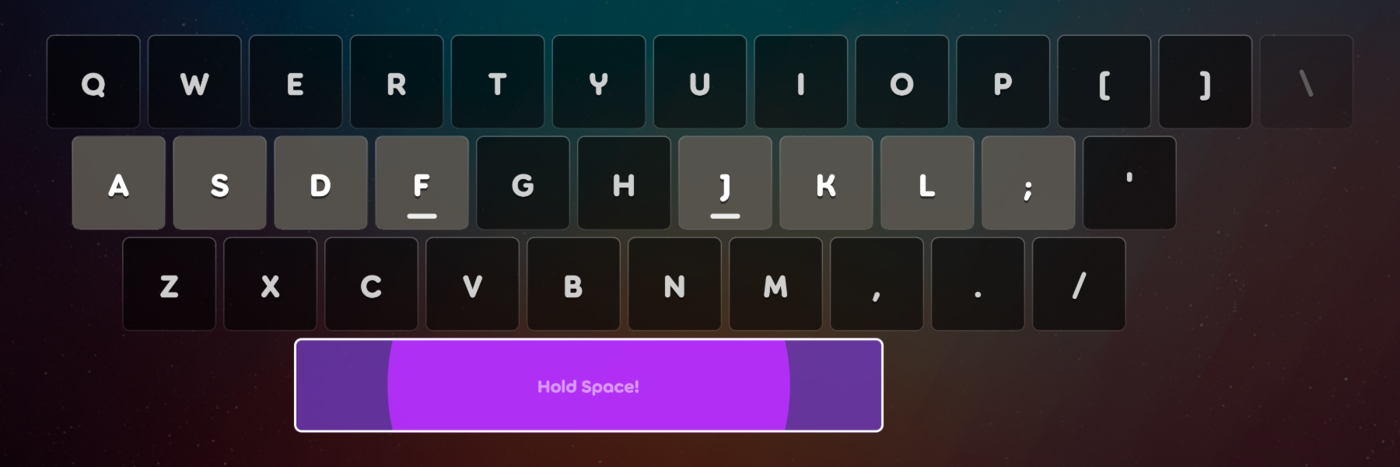
  • Spinners become a hold on the Space bar: keep Space down until the spinner ends.
  • Notes land near where they were in the original map: the top of the screen is the top letter row, the left is the left.
  • Timing and scoring are the same as osu!: Great, Ok, Meh and Miss, shown under the key you pressed with your skin's own graphics. Note colours are your skin's (or the map's) combo colours.
  • The game reads keys by where they are, not by what they type, so any keyboard language works. Pick what is printed on your keys in the settings.

A spinner on the Space bar: a circle grows out from the middle while Space is held

Mods

The mods you know from osu!, in the same groups, plus a few of keybosu!'s own.

Group Mods
Difficulty reduction Easy, No Fail, Half Time, Daycore
Difficulty increase Hard Rock, Sudden Death, Perfect, Double Time, Nightcore, Hidden, Original Density
Conversion Difficulty Adjust, Mirror, Left Hand, Right Hand, Home Row
Automation Autoplay, Cinema
Fun Wind Up, Wind Down, Muted

keybosu!'s own mods:

  • Original Density – maps are made easier by default (very fast notes are thinned out, and the keys at the far edges are used less). This mod gives you every note of the map, on every key, at the map's own speed.
  • Left Hand / Right Hand – every note lands on one half of the keyboard, for playing with one hand.
  • Home Row – every note lands on the eight keys your fingers rest on (A S D F and J K L ; on a QWERTY keyboard).
  • Mirror – the map flipped left to right.
  • Hidden – notes fade out before they are due, so you press them from memory.

Keys that a mod leaves without notes are drawn dim:
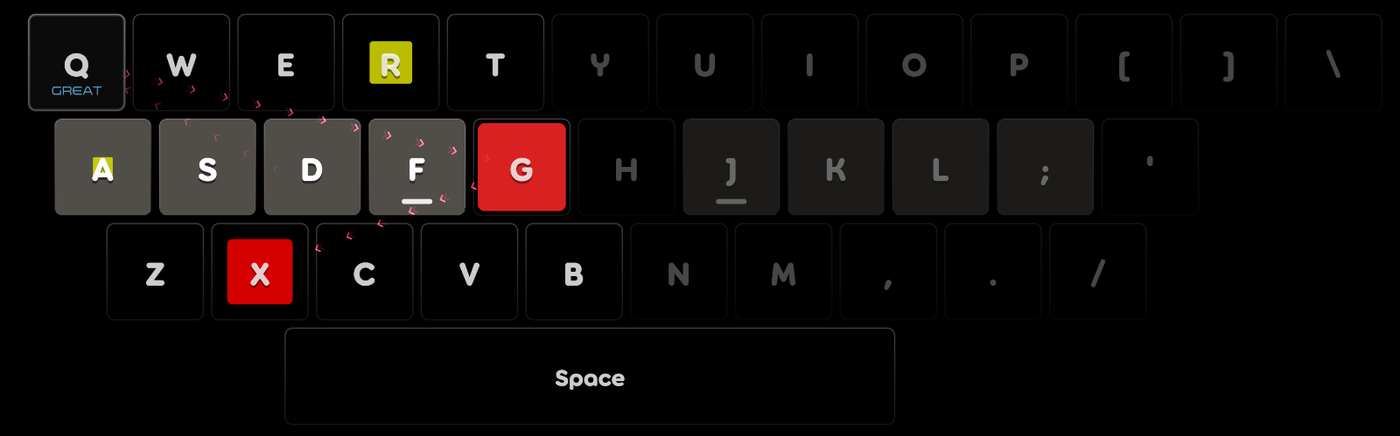
The Left Hand mod: notes only on the left half of the keyboard, the right half dimmed

Install

  1. Download osu.Game.Rulesets.Keybosu.dll from the latest release.
  2. Put it in the rulesets folder inside your osu!lazer data folder (create the folder if it is not there):
  3. Windows: %AppData%\osu\rulesets\
  4. Linux: ~/.local/share/osu/rulesets/
  5. macOS: ~/Library/Application Support/osu/rulesets/
  6. Restart osu!lazer. keybosu! is now in the list of game modes.

Updating? Close osu!lazer, replace the file, start the game again. Your scores and settings stay. If you still have a very old osu.Game.Rulesets.Keyboard.dll in that folder, delete it.

Settings

Under Settings → Ruleset → keybosu!. They apply the next time a map starts.
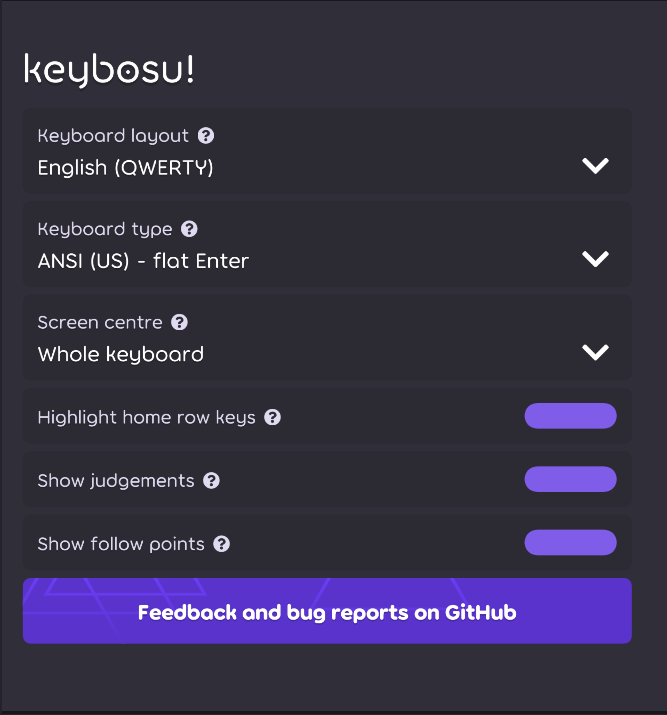
keybosu!'s settings in osu!lazer: keyboard layout, keyboard type, screen centre and three switches

Setting What it does
Keyboard layout What is printed on the keys: 29 layouts, from English QWERTY to Turkish F, AZERTY, Dvorak and more.
Keyboard type ANSI (flat Enter) or ISO (tall Enter, with an extra key left of Z).
Screen centre Which part of the keyboard sits in the middle of the screen: the whole keyboard, the Space bar, or the point between your index fingers.
Highlight home row keys Gives the eight keys your fingers rest on a lighter colour.
Show judgements Great / Ok / Meh / Miss under the key you pressed.
Show follow points The points that lead from each note to the next.

Everything is translated into the 39 languages osu! supports and follows osu!'s own language setting.

Good to know

  • Custom rulesets never give PP.
  • Please keep the default key bindings. If your keyboard does not match, choose it under Keyboard layout instead.
  • A few keys that only some keyboards have are drawn dim and never get notes.
  • Star ratings are the map's osu! stars; only the speed mods change them.
  • Replays are not recorded yet (Autoplay works).
  • If osu!lazer says the ruleset was disabled after a crash, install the latest release again.
  • Built for osu!lazer 2026.1026. After a big osu!lazer update the ruleset may need a new release.

Found a bug or have an idea? Open an issue.

Translations

The translations were first made with AI help, so some may read oddly. If you speak one of the languages, you can fix them on Crowdin: no coding and no GitHub account needed.

Licence

MIT. The project layout and a few unchanged files come from the osu! ruleset templates by ppy Pty Ltd, also MIT (see NOTICE). keybosu! is a fan-made ruleset and is not affiliated with ppy.


Türkçe

keybosu!, bütün klavyenin oyun alanı olduğu bir osu!lazer oyun modu. Ekrandaki klavyenin tuşlarında renkli kareler büyür; kare tuşu doldurduğu anda o tuşa basarsın. Elindeki bütün osu! haritaları otomatik olarak dönüştürülür.

  • Nasıl oynanır: Kare dolarken parlar ve tam zamanında en parlak hâline gelir; solmaya başladıysa geç kaldın. Follow point'ler bir notadan sonrakine yol gösterir. Spinner'larda Boşluk tuşuna basılı tutarsın.
  • Modlar: osu!'daki modlar aynı gruplarda (Easy, Hard Rock, Double Time, Nightcore, Hidden, Sudden Death...). keybosu!'ya özel olanlar: Original Density (haritanın bütün notaları), Left Hand / Right Hand (tek elle), Home Row (sadece parmakların durduğu sekiz tuş) ve Mirror.
  • Kurulum: Son sürümden osu.Game.Rulesets.Keybosu.dll dosyasını indir, osu!lazer veri klasöründeki rulesets klasörüne koy (Windows: %AppData%\osu\rulesets\, Linux: ~/.local/share/osu/rulesets/), oyunu yeniden başlat.

  • Ayarlar: Klavye düzeni (Türkçe Q ve F dahil 29 düzen), klavye türü, ekran merkezi, temel sıra vurgusu, isabet dereceleri ve follow point'ler. Hepsi osu!'nun desteklediği 39 dile çevrili.
  • Özel rulesetler PP vermez. Çevirilerde hata görürsen Crowdin üzerinden düzeltebilirsin.